๐ŸŽ‰ Eazy Reminder is now on iOS, Android & Web โ€” start free today.
โ˜…โ˜…โ˜…โ˜…โ˜… Loved by busy people

Never forget
anything again.

Capture reminders as a photo, voice note, text or location, organise them in folders, share with anyone, and sync across all your devices โ€” online or off.

Free to start No ads on paid plans Cancel anytime
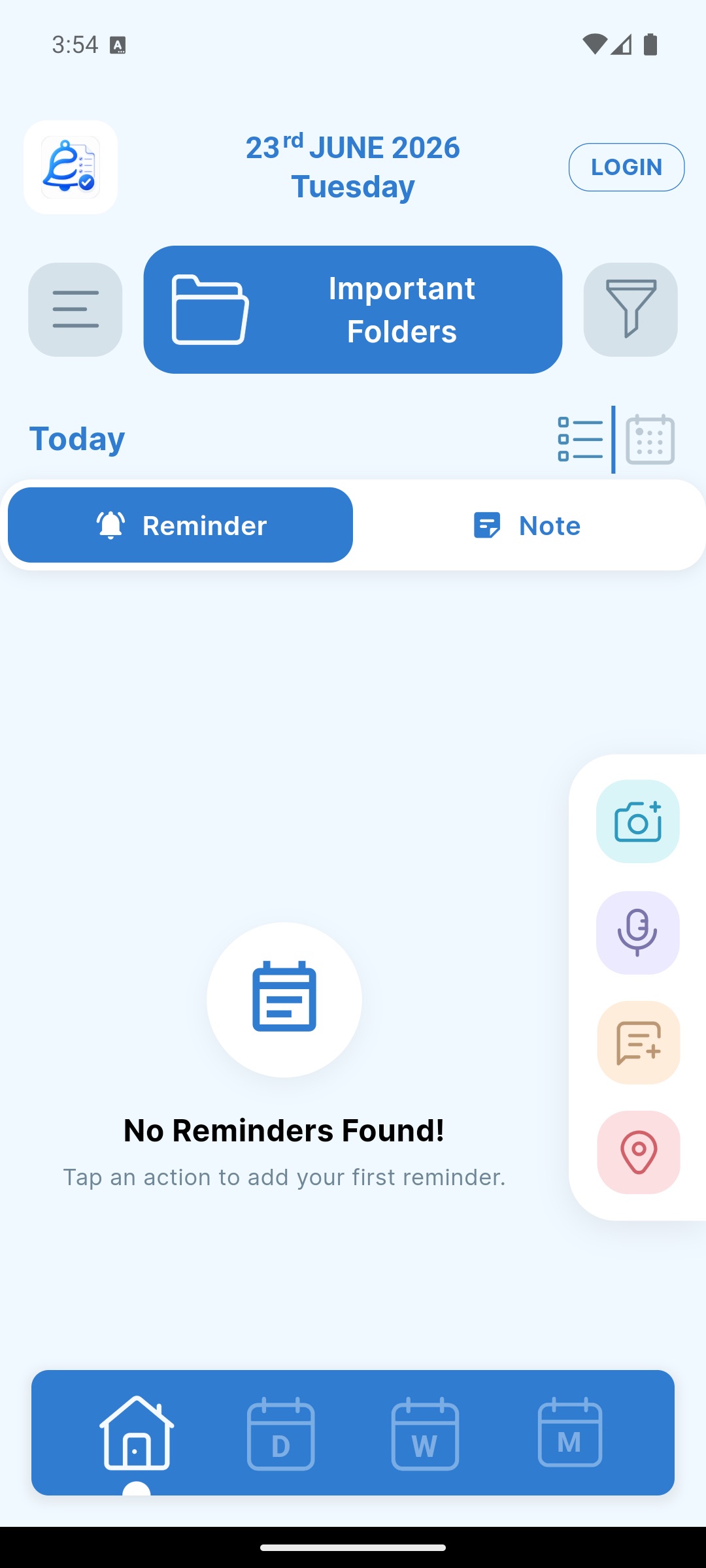
Eazy Reminder app โ€” home screen showing reminders
5 types
Photo ยท Voice ยท Text ยท Location ยท PDF
Offline-first
Works without internet
Cloud sync
Across all your devices
iOS ยท Android ยท Web
One account, everywhere
Features

Everything you need to remember

One app for tasks, documents, voice notes and place-based reminders.

Five ways to capture

Whatever's fastest in the moment โ€” snap it, say it, type it or pin it. Eazy Reminder fits the way you think.

Photo Voice Text Location PDF
Pay electricity bill
Photo ยท Tomorrow 10:00
Call the plumber
Voice ยท 0:12

Reliable notifications

Snooze or complete right from the notification, with 8 ringtones to choose from.

Recurring & pre-reminders

Daily, weekly, monthly or custom โ€” with early heads-up alerts before the due time.

Folders & sub-folders

Keep payments, health and work neatly organised with folders and sub-folders โ€” and lock private ones with a PIN.

Offline-first + cloud sync

Works without internet; syncs across your devices automatically when you're signed in.

Share with anyone

Share a reminder or a whole folder (with its sub-folders) by phone, to Family & Friends groups, or via an invite link โ€” each person gets their own copy.

Calendar views & export

See everything by day, week or month with priorities and colour tags โ€” and export to Google & Apple Calendar.

๐ŸŒ Web app โœ… To-do boards โฐ Alarms ๐ŸŽ‚ Events (birthdays) ๐Ÿ“ Notes with colours ๐Ÿ”’ Lock notes & folders ๐Ÿ“ฃ Full-screen alerts ๐Ÿ“ฒ Lock-screen next alarm ๐ŸŽ Refer & earn ๐ŸŒ™ Dark mode ๐Ÿšฉ Priorities ๐Ÿ–ผ๏ธ Up to 12 photos ๐Ÿ“„ PDF attachments โฐ Custom snooze ๐Ÿ”” 8 ringtones ๐Ÿ”Ž Search & filter ๐Ÿ—‚๏ธ Copy / move ๐Ÿ–๏ธ Left-handed mode
How it works

Set a reminder in seconds

Three simple steps โ€” then let the app do the remembering.

1

Capture it

Snap a photo, record a voice note, type a task, or drop a location pin.

2

Organise & set

Sort into folders, pick a time or place, add a recurring schedule, and share if you like.

3

Get reminded

A reliable alert pings at the right time or place. Snooze or complete in one tap.

New

Now on the web, too

Open Eazy Reminder in your browser and pick up right where your phone left off. Scan a QR code from the app to sign in securely โ€” no password โ€” and your reminders, notes, folders and to-dos stay in sync across devices.

Web access is a Pro feature. Sign in on the phone app, then scan the QR shown in your browser.

Synced across devices

Scan to sign in

See it in action

One app, every kind of reminder

Pick a reminder type and watch it come to life on screen.

23 JUN ยท THURSDAY
Today
PHOTO REMINDER
Pay electricity bill
JPGPDF
Tomorrow ยท 10:00 AM
VOICE REMINDER
Call the plumber back
0:12
Today ยท 6:30 PM
TEXT & NOTES
Weekend groceries
  • Milk & eggs
  • Bread, rice
  • Coffee
Today ยท 5:00 PM
LOCATION REMINDER
Pick up the parcel
Near home ยท within 200 m
PDF & DOCUMENTS
PDF
Car_insurance.pdf
2.4 MB ยท 4 pages
Renew car insurance
In 3 days ยท 9:00 AM
DWM
Use cases

Perfect for everyday life

However you live and work, Eazy Reminder keeps you on track.

Bills & payments

Snap a bill, get reminded before the due date.

Health & medicine

Never miss a pill, appointment or refill.

Documents & IDs

Keep insurance, warranties and IDs handy.

Family & home

Share a home folder so nothing slips.

Work & deadlines

Recurring tasks and project follow-ups.

Events & occasions

Birthdays, renewals and special days.

Testimonials

People love staying organised

โ˜…โ˜…โ˜…โ˜…โ˜…
"The photo reminders are a lifesaver โ€” I just snap a bill and forget about it until it pings me. Brilliant."
A
Aarav S.
Small business owner
โ˜…โ˜…โ˜…โ˜…โ˜…
"I share a 'Home' folder with my wife so we never miss a payment or a school event. Works perfectly across our phones."
P
Priya M.
Working parent
โ˜…โ˜…โ˜…โ˜…โ˜…
"Voice reminders + recurring schedules keep my whole week running. And it still works when I'm offline."
R
Rahul K.
Freelancer
Pricing

Simple, affordable pricing

Start free, or unlock everything with Premium โ€” pay monthly, or save with annual.

Free

โ‚น0

forever โ€” no card needed

  • โœ“ All 5 reminder types
  • โœ“ Folders & sub-folders
  • โœ“ Up to 50 synced reminders
  • โœ“ Day, week & month views
Get started free

Monthly

โ‚น59/mo

billed monthly ยท cancel anytime

  • โœ“ Everything in Free, plus:
  • โœ“ Unlimited reminders
  • โœ“ Cloud storage & backup
  • โœ“ Share folders & reminders
  • โœ“ Sync across all devices & web
  • โœ“ Ad-free
Choose Monthly
BEST VALUE

Annual

โ‚น365/yr

โ‰ˆ โ‚น30/mo ยท SAVE 48%

  • โœ“ Everything in Free, plus:
  • โœ“ Unlimited reminders
  • โœ“ Cloud storage & backup
  • โœ“ Share folders & reminders
  • โœ“ Sync across all devices & web
  • โœ“ Ad-free
Choose Annual

Prices shown in โ‚น for India. Subscriptions renew automatically until cancelled โ€” manage or cancel anytime in your App Store / Google Play account.

Compare plans Free Premium
All 5 reminder typesโœ“โœ“
Folders & sub-foldersโœ“โœ“
Synced reminders50Unlimited
Cloud storage & backupโ€”โœ“
Share folders & remindersโ€”โœ“
Sync across devices & webโ€”โœ“
Ad-freeโ€”โœ“

Premium features are the same whether you pay monthly or annually โ€” annual just costs less.

FAQ

Frequently asked questions

Is Eazy Reminder free? +

Yes. The Free plan includes all reminder types with 100 MB of cloud storage and up to 50 synced reminders. Paid plans add more storage and remove ads.

Does it work offline? +

Absolutely. Eazy Reminder is offline-first โ€” everything is saved on your device and syncs to the cloud when you're signed in and online.

How do I cancel a subscription? +

Manage or cancel anytime from your App Store or Google Play account. Your plan stays active until the end of the current billing period.

Can I use Eazy Reminder on my computer? +

Yes. Open the web app at web.eazyreminder.com and scan the QR code with your phone to sign in securely โ€” no password. Your reminders, notes, folders and to-dos stay in sync. Web access is a Pro feature.

Who can I share with, and can I share a whole folder? +

Share a reminder or an entire folder โ€” including its sub-folders and their reminders โ€” by phone number, with Family & Friends groups, or via an invite link for people not on the app yet. Each recipient gets their own copy when they accept (not live co-editing).

What's the difference between reminders, alarms and events? +

Reminders are scheduled tasks you can capture as a photo, voice note, text, file or place. Alarms are clock-style alarms that ring on chosen days with a ringtone. Events track yearly dates like birthdays and anniversaries so you're reminded every year.

Does it have notes and to-do lists? +

Yes โ€” jot colour-coded notes with no schedule, and organise tasks on To-Do boards with cards you move between columns. Pro unlocks unlimited boards and cards.

Can I lock private notes or folders? +

Set a PIN to lock individual notes or whole folders; locked items ask for the PIN before they open. Pro includes unlimited locks.

Can I add reminders to Google or Apple Calendar? +

Yes โ€” with Pro you can export reminders to Google and Apple Calendar so they appear alongside your other events.

I'm not getting notifications โ€” what should I do? +

Most missed alerts are the phone sleeping the app. Turn off battery optimisation for Eazy Reminder, allow the "Alarms & reminders" permission, and enable Autostart on phones that have it (Xiaomi, Oppo, Vivo and similar).

Can I delete my account and data? +

Yes โ€” delete your account in-app at any time. You can recover it within 30 days by signing back in with the same account; after 30 days your account and all data are permanently deleted and cannot be recovered.

Get organised today

Download Eazy Reminder and never miss what matters.